<目次>
Azure Blob Storageに対してAPI経由でファイルをアップロードする方法(Python)
概要
サンプルプログラム
実行結果と注意点
Azure Blob Storageに対してAPI経由でファイルをアップロードする方法(Python)
Azure Blob Storage上のcsvに対して、Azureの外部アプリから更新(httpのPUTリクエストでcsvに書き込み)をするための方法とサンプルプログラムをご紹介します。
概要
(ポイント)
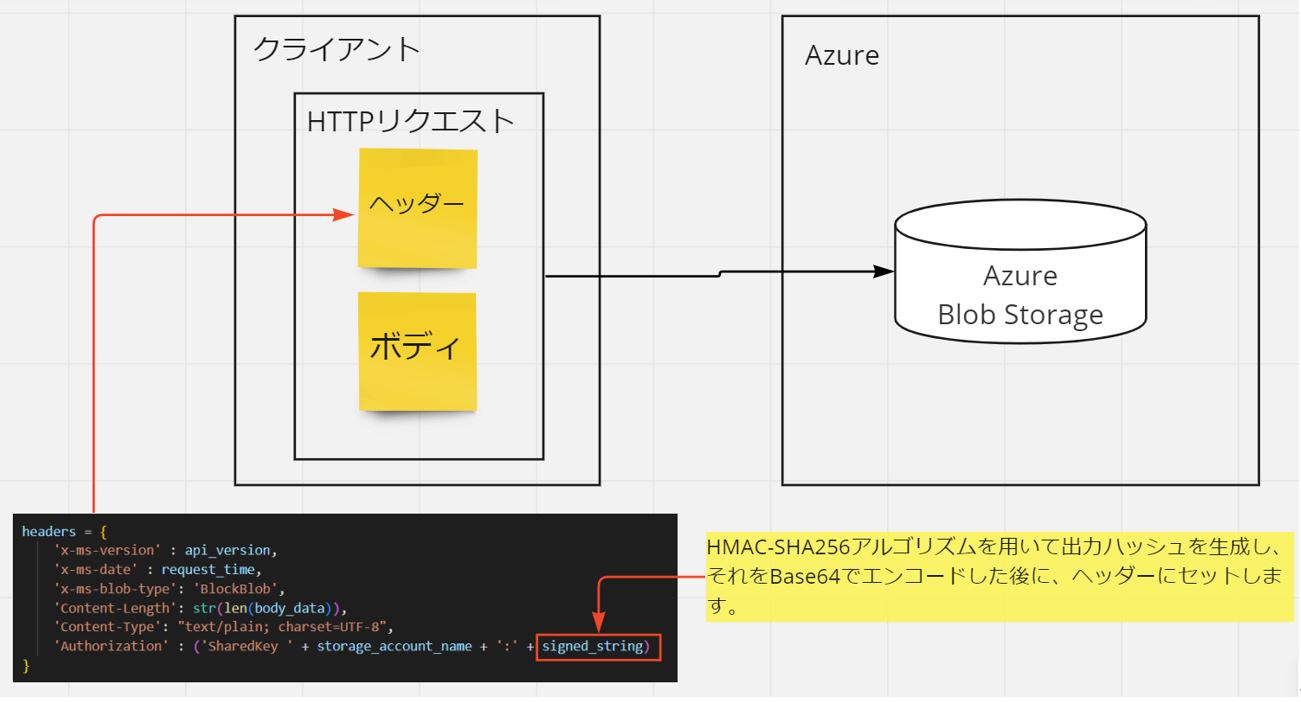
Azure Storageの認証は単にアクセスキーを指定するのみに留まりません。リクエストを証明するための「シグニチャ文字列」を生成して、それをヘッダーにセットして渡す必要があります。
シグニチャ文字列は「HMAC-SHA256」アルゴリズムを用いて出力ハッシュを生成し、それをBase64でエンコードした後に、ヘッダーにセットした上でHTTPリクエストを投げる事で、初めて更新が可能になります。
(図111)
>目次にもどる
サンプルプログラム
今回は上記をPythonのプログラムで実現したサンプルをご紹介します。
(xxxxxの部分をご自身の値に置き換えて頂けたら、動作するようになっています)
import requests
import datetime
import hmac
import hashlib
import base64
from requests.auth import HTTPBasicAuth

def main():

  storage_account_name = 'xxxxxxxxxxxxxxxxxxxxxxx'
  storage_account_key = "xxxxxxxxxxxxxxxxxxxxxxxxx"
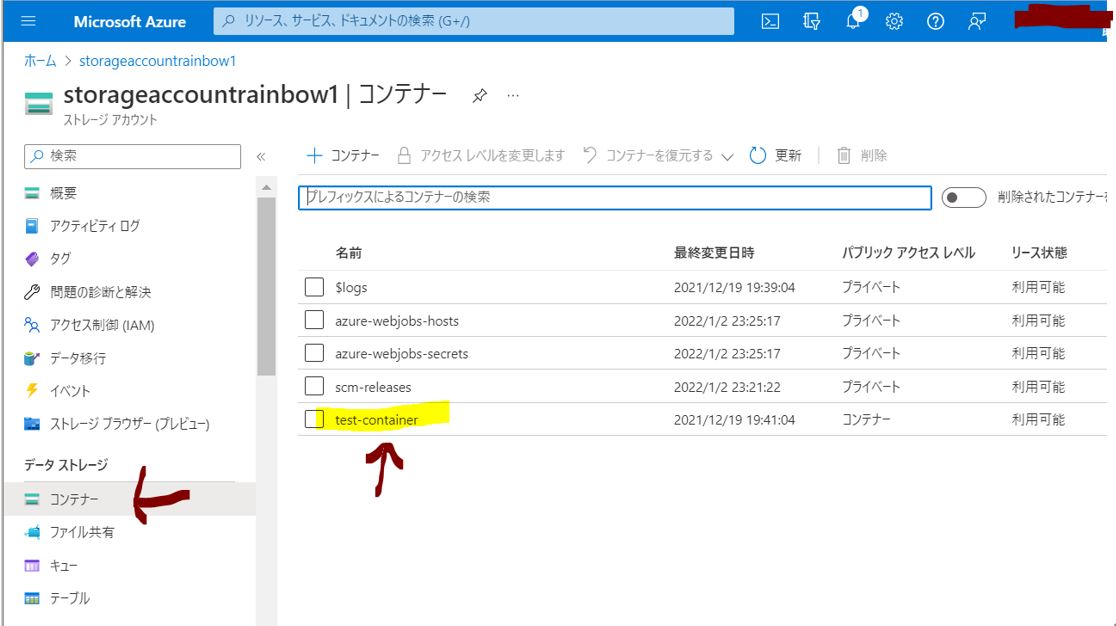
  container_name='xxxxxxxx'
  csv_name = 'xxxxxx.csv'
  api_version = '2015-02-21'
  #body_data = input["contents"]
  body_data = 'xxxx好きな文字列を設定xxxx'
  request_time = datetime.datetime.utcnow().strftime('%a, %d %b %Y %H:%M:%S GMT')
  print(request_time)

  string_params = {
      'verb': 'PUT',
      'Content-Encoding': '',
      'Content-Language': '',
      'Content-Length': str(len(body_data)),
      'Content-MD5': '',
      'Content-Type': 'text/plain; charset=UTF-8',
      'Date': '',
      'If-Modified-Since': '',
      'If-Match': '',
      'If-None-Match': '',
      'If-Unmodified-Since': '',
      'Range': '',
      'CanonicalizedHeaders': 'x-ms-blob-type:BlockBlob' + '\nx-ms-date:' + request_time + '\nx-ms-version:' + api_version + '\n',
      'CanonicalizedResource': '/' + storage_account_name +'/'+container_name+ '/' + csv_name
  }

  string_to_sign = (string_params['verb'] + '\n'
                    + string_params['Content-Encoding'] + '\n'
                    + string_params['Content-Language'] + '\n'
                    + string_params['Content-Length'] + '\n'
                    + string_params['Content-MD5'] + '\n'
                    + string_params['Content-Type'] + '\n'
                    + string_params['Date'] + '\n'
                    + string_params['If-Modified-Since'] + '\n'
                    + string_params['If-Match'] + '\n'
                    + string_params['If-None-Match'] + '\n'
                    + string_params['If-Unmodified-Since'] + '\n'
                    + string_params['Range'] + '\n'
                    + string_params['CanonicalizedHeaders']
                    + string_params['CanonicalizedResource'])

  signed_string = base64.b64encode(hmac.new(base64.b64decode(storage_account_key), msg=string_to_sign.encode('utf-8'), digestmod=hashlib.sha256).digest()).decode()

  headers = {
      'x-ms-version' : api_version,
      'x-ms-date' : request_time,
      'x-ms-blob-type': 'BlockBlob',
      'Content-Length': str(len(body_data)),
      'Content-Type': "text/plain; charset=UTF-8",
      'Authorization' : ('SharedKey ' + storage_account_name + ':' + signed_string)
  }

  url = ('https://' + storage_account_name + '.blob.core.windows.net/' + container_name + '/' + csv_name)
  r = requests.put(url, headers = headers,data=body_data)
  return {'dummy': 'dummy_data'}

if __name__ == "__main__":
    main()
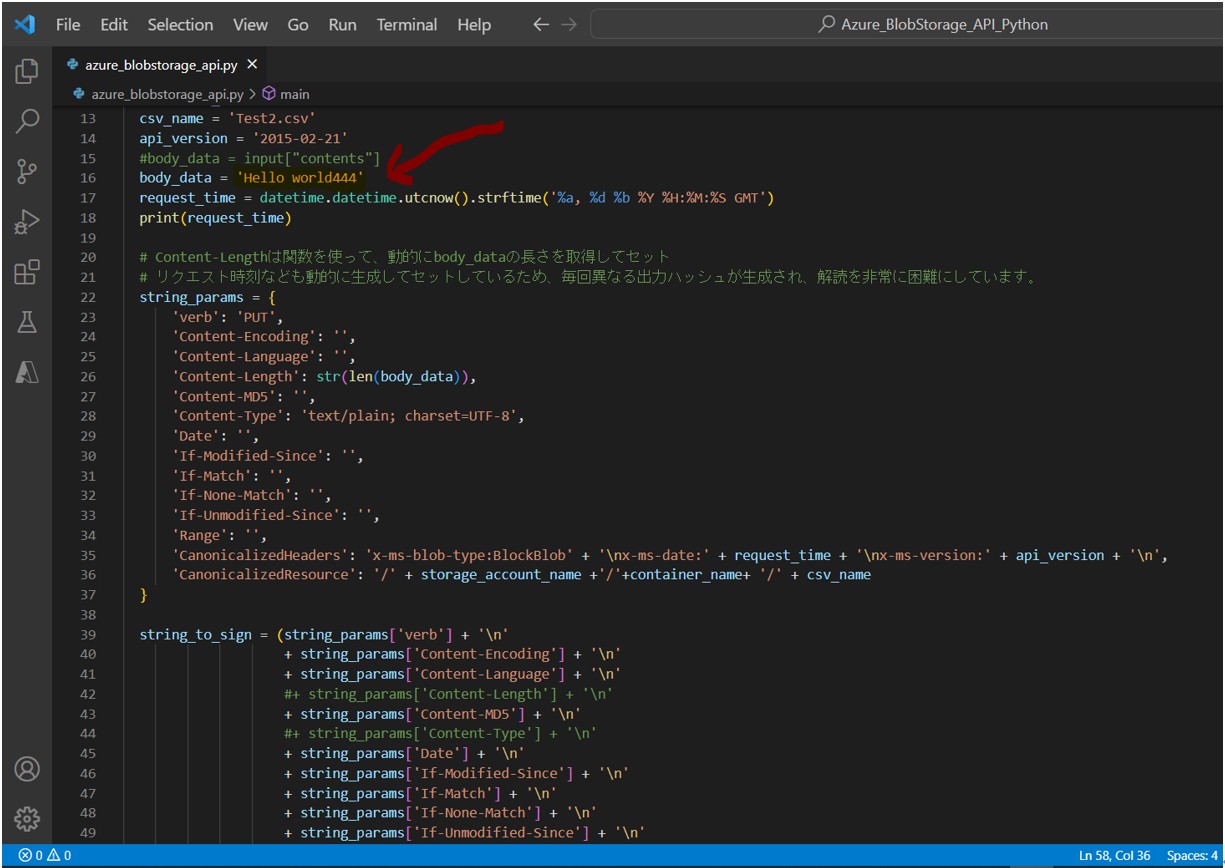
例では「Test2.csv」というファイルに「Hello world444」という文字列を書き込みしようとしています。
(図121)
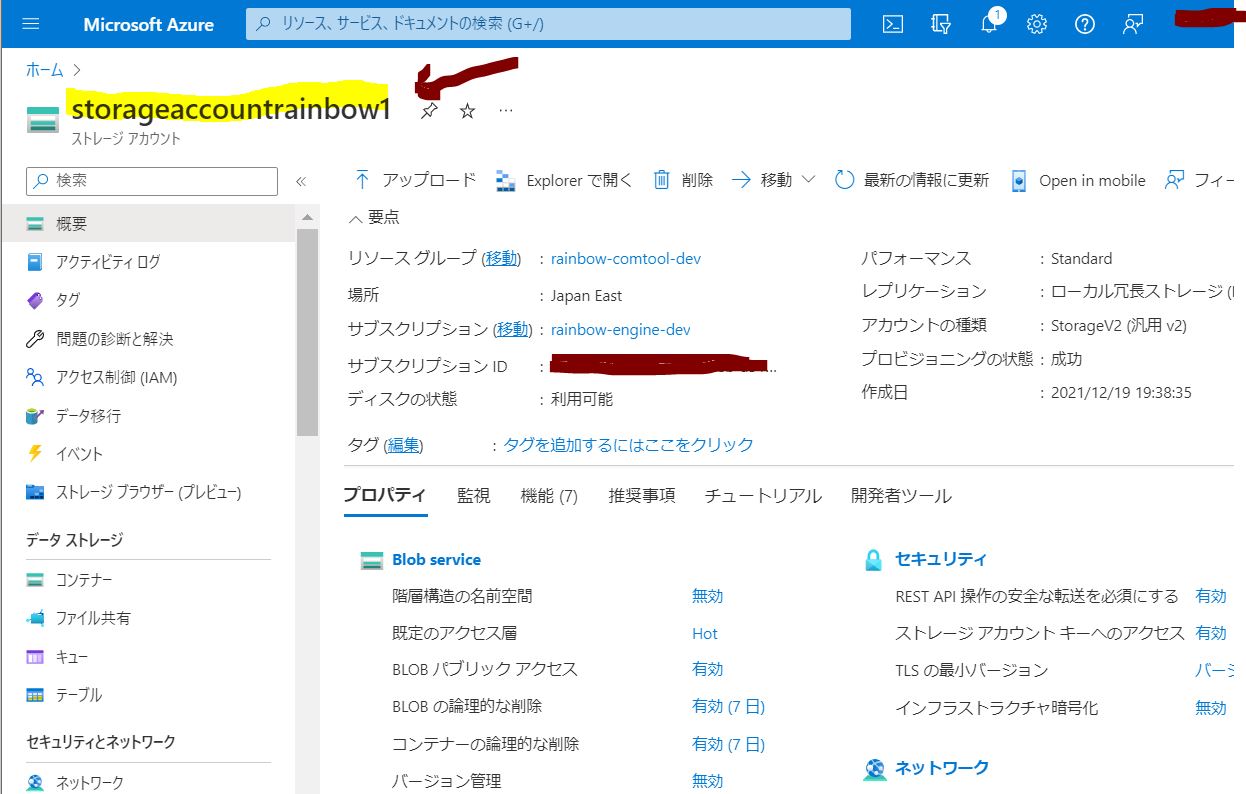
●storage_account_name
(図130)
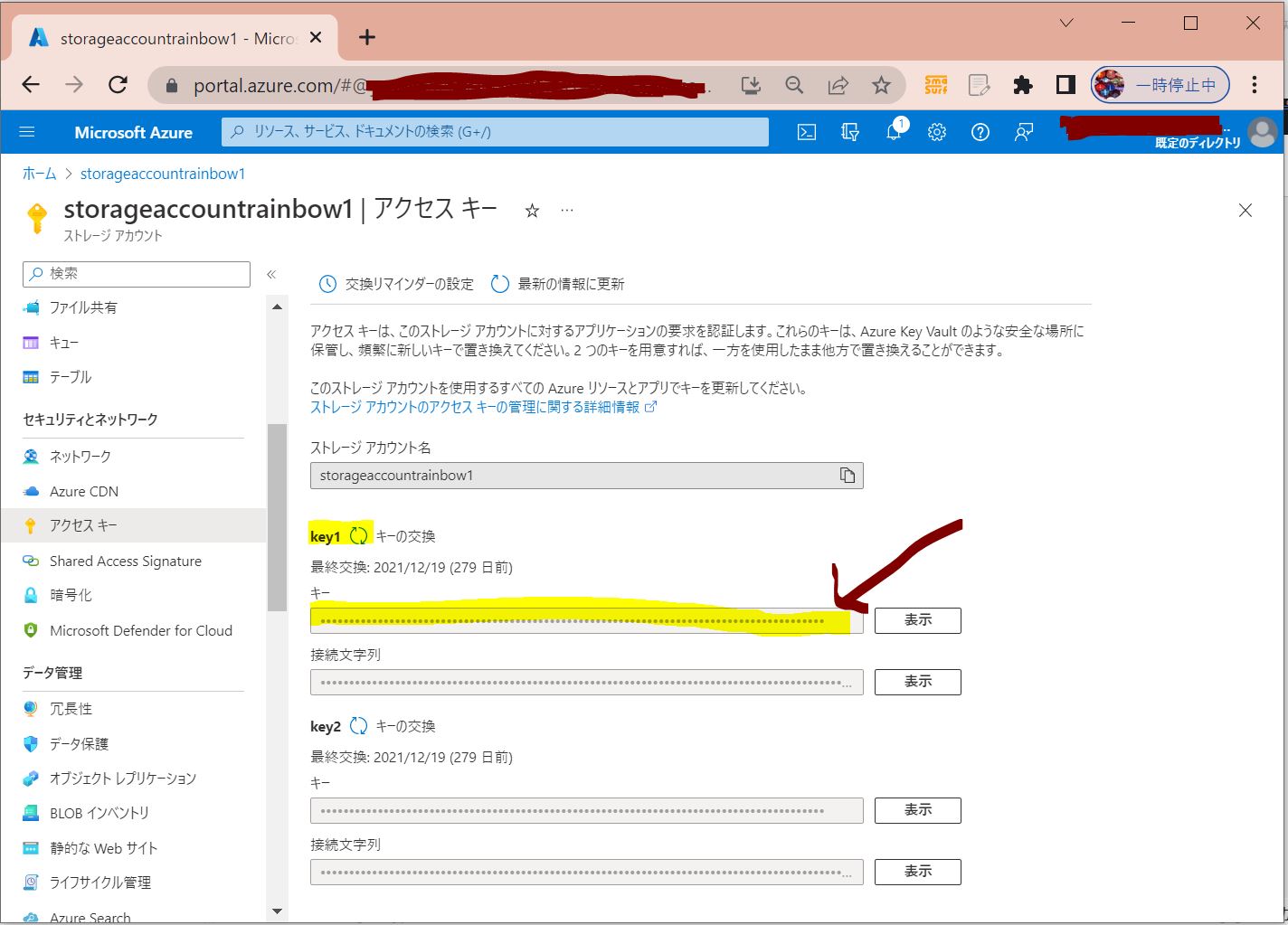
●storage_account_key
・ストレージアカウント→「アクセスキー」ブレード→「key1」
(図131)
●container_name
(図132)
>目次にもどる
実行結果と注意点
Azure Blob Storage上の「Test2.csv」に「Hello world444」という文字列を書き込まれています。
(図141)
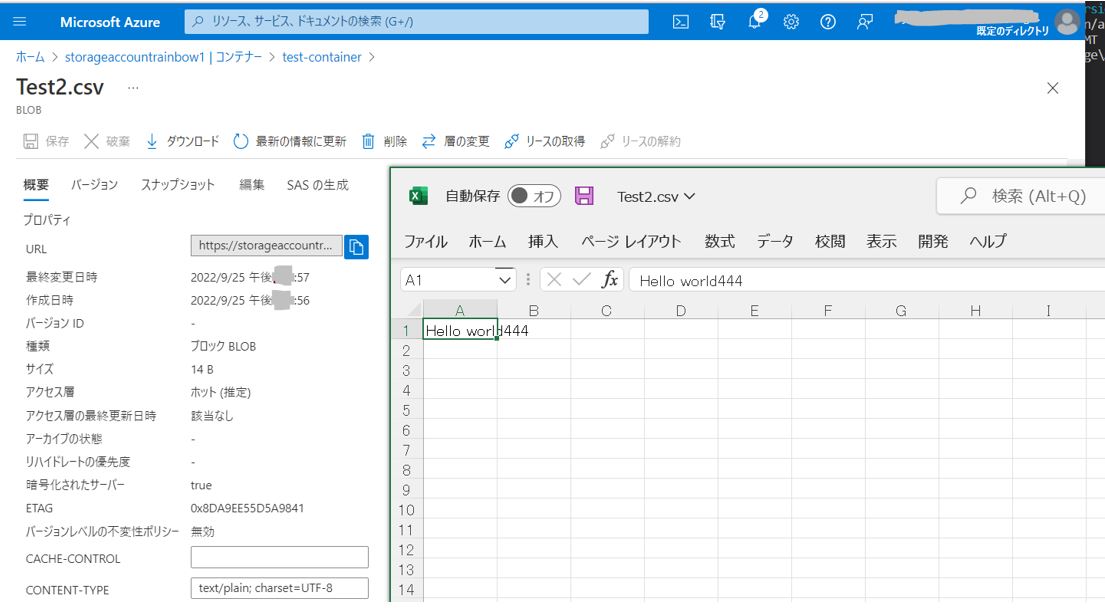
もしも、csvのタイムスタンプ等が更新されない場合は、シグニチャ文字列に何かしら問題がある可能性があります(エラーにはならないため、気づきにくい)。
>目次にもどる